Highlighted
The WiFi solution for your living situation
We'll help you find a solution for your WiFi problem in 2 steps here.
This is the one
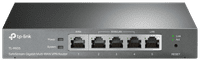
TP-Link Omada ER605
Current product
53,-
62,-
56,-
59,-
Gigabit Ethernet (1000Mbps)
Fast Ethernet (100Mbps)
Gigabit Ethernet (1000Mbps)
Gigabit Ethernet (1000Mbps)
According to our router expert
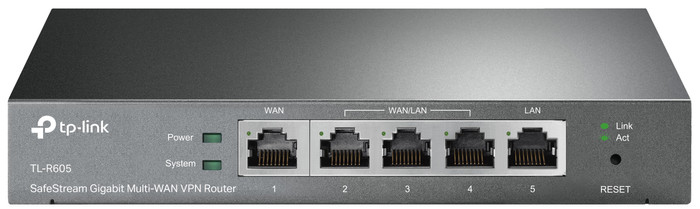
The TP-Link Omada ER605 is a business router that you manage via the cloud and intended for companies with up to 30 employees and an average internet use. Place this router in your network and connect it with TP-Link Omada access points and switches to provide all your employees with internet. Add a controller to manage all these devices at the same time. With this router, you provide your network with optimal protection. For example, you can set up multiple VPN connections and provide your company network with a powerful firewall. You can set up the filters in such a way that attackers can't get their hands on company secrets.
Ethernet speed | Gigabit Ethernet (1000Mbps) | |
|---|---|---|
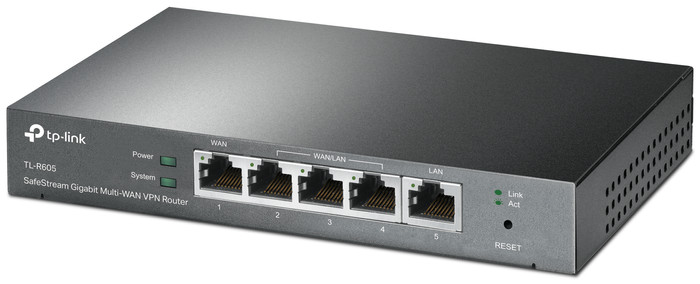
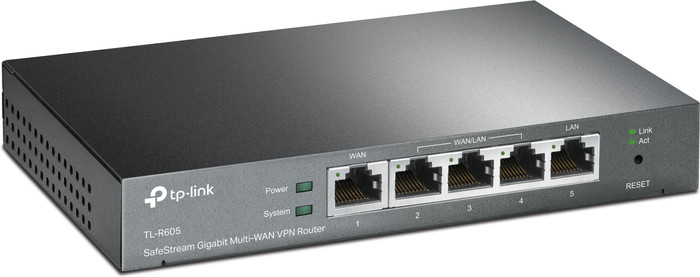
Number of Ethernet ports | 5 | |
Type router | Business router | |
Number of stations | 1 |
5 stars
7
4 stars
2
3 stars
1
2 stars
0
1 star
0
My situation: I use multiple TP-Link AP (3) and Switches (2) in my home network. To manage all this I use the Omada software controller via a Docker on my Synology. This all works very well and adding an extra AP can be done in seconds. Awesome!
Why this router: Because I want to have more control over my router, I used the Ziggo modem/router for this, I decided to also buy an Omada TP-link router. There are two different routers for sale in this professional line. I chose the TL-R605, the TL-ER7206 has an additional SFP port, but I wouldn't use that anyway. The price is also a lot more expensive. Therefore a TL-R605.
Installation: Initially I used the router standalone for a few days, so without including it in the Omada controller. This worked very well and installation and configuration was done in no time. A week later I had some more time and I started to adopt (adopt) the router in the Omada environment. This was difficult and every time I tried to record it, the router got a kind of reset of IP address and admin account. Because of this I couldn't get into the router anymore and I had to bring the router back to factory default. Very frustrating! Then search the TP-Link forum to see if people also have this problem. Several forum users report this problem and luckily a solution has also been posted. Short explanation of the solution: bring your Omada controller to the same subnet as the router's default (subnet: 192.168.0.X). then recording will work. Then you can put the controller and router back on your desired subnet.
Conclusion: Despite the bug when recording in the Omada controller, I recommend this product. You do need some knowledge to install it, but I think if you choose to buy a dedicated router that you also have this knowledge. Furthermore, the router works very stable and the configuration is extensive and easy. Hopefully this bug will be recognized by the manufacturer and fixed soon.
PS. There is no wifi but had to give stars for the range. And because I didn't want to lower the score, I set it to 5.
Auke Boskma
6 May 2021
Automatically translated from Dutch
After extensive experience with EdgeMax and Unifi before the move, we decided to switch to the Omada environment. The reason for the combination of EdgeMax and Unifi was that Unifi did not work smoothly and turned out to be unstable at the strangest moments. EdgeMax is much more stable, but also more complex. Omada seems to be a very good alternative to Unifi, and so far all the basic settings are simple and effective. VLANs are quick to set up, firewall rules are logical and easy to implement. I opted for an OC200 hardware Omada controller, where the router, switch and EAP are very easy to add to the environment, after which everything is centrally controlled. Very smooth experience so far, I think "pro-sumers" and home lab-ers should seriously consider purchasing this system. Not unimportant; it's a lot cheaper than Ubiquiti, but with the same features.
Pieter
31 July 2021
Automatically translated from Dutch
Use friendly in combination with omada check
sanid cisic
14 May 2021
Automatically translated from Dutch
Coolblue takes care of everything, from taking out an insurance to repairs
For almost all accidents
More coverage in case of damage than your standard warranty
No deductible
First, add your router to your shopping cart. On the next page, choose the Protection Plan below. You always have a 30-day return window and pay no deductible in case of damage.
2-year Protection Plan
7,99
one-time3-year Protection Plan
8,99
one-time
Product number | 874760 | |
|---|---|---|
Manufacturer code | TL-ER605 | |
Brand | TP-Link | |
Warranty | 3 years | |
Processing of your defect | Via Coolblue | |
Old product returned for free |
Type router | Business router | |
|---|---|---|
WiFi speed class | Basic | |
Number of stations | 1 | |
Can be expanded with extra stations | ||
Built-in modem |
Jumbo frame support |
|---|
Ethernet speed | Gigabit Ethernet (1000Mbps) | |
|---|---|---|
Network connector | ||
Number of Ethernet ports | 5 | |
SFP/GBIC ports | 0 | |
PoE support | ||
USB port |
Automatically switches to 3G/4G | ||
|---|---|---|
SIM card slot |
Quality of Service (QoS) | ||
|---|---|---|
MU-MIMMO | ||
Seamless roaming | ||
Beamforming | ||
Port forwarding | ||
LACP Link aggregation |
Parental controls | ||
|---|---|---|
Firewall | ||
Firewall type | DoS, SPI Firewall | |
Guest network | ||
VPN support | ||
VPN server | ||
VPN client | ||
VPN passthrough |
Mounting possible | ||
|---|---|---|
Width | 10,09 cm | |
Height | 2,54 cm | |
Depth | 15,8 cm | |
Weight | 360 g | |
Color | Black | |
Material | Metal |
Power supply type | Power grid |
|---|