Never available again
View alternatives in the sidebar
View alternatives in the sidebar
According to our monitor expert
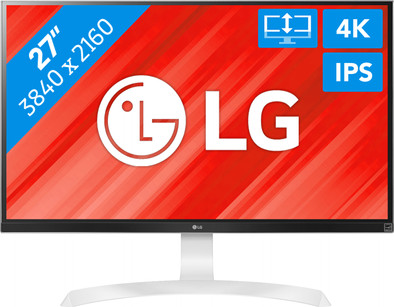
With the LG 27UD69P monitor, visible pixels are a thing of the past. This 27-inch screen has a 3840x2160 resolution, so images are 4 times sharper than on a Full HD screen. Use the Split Screen function to easily open multiple windows side by side. Work in 2 applications simultaneously and easily transfer data from Gmail to PowerPoint. This LG monitor can be fully adjusted to ensure comfortable posture. Regardless of how you position the monitor, colors will be clearly visible from all angles thanks to the IPS panel. The monitor also features an anti-glare layer, so reflections and glare won't be an issue.
Sharpness | 4K (UHD) | |
Curved | ||
Aspect ratio | Standard (16:9) | |
Refresh rate | 60 Hz | |
Response time | 5 ms | |
Panel type | IPS panel | |
Color depth | 17 million colors (8-bit) | |
Built-in speakers |
5 stars
16
4 stars
6
3 stars
1
2 stars
0
1 star
0
Installation ease
Image quality
Price-quality ratio
Design
After ordering and returning a different, cheaper, screen twice (an AOC 32" and an Iijama 28", thanks to Coolblue for the good service), I finally ended up with this one. Where I was still in doubt about the other screens because they were 'not perfect, but maybe good enough', I was immediately sold with this screen. I'm glad I finally put some more money on the table. It has a matte coating and the brightness is well adjustable so that I can use the screen perfectly with a window behind me. The colors are fantastic and the 4K image is really sharp. I find the image more stable (no flickering or 'motion' at all) than the other screens I tested. It is much less tiring on the eyes. The menu is also very intuitive, so you can adjust it very quickly and easily to taste. No matter what angle you look at it, the colors and legibility don't change. For such a large screen, this is important because you are sitting right in front of the center, and by definition see the sides from an angle. I also like the design with the super narrow edges. And it is handy that the foot does not take up too much space. But that's taste of course. The height and tilt can be easily adjusted. Rotation (vertical/horizontal) and rotation (viewing angle) are not possible with this screen. Due to the shape of the foot and the anti-slip layer underneath, you can't easily turn the screen around (eg to someone sitting at the back of the table). Also important: first check whether your video card can handle the high resolution. Mine can only do it in 30Hz, but since I use it for programming and word processing it doesn't bother me.
Sabine Verhaest
5 April 2018
Automatically translated from Dutch
I ordered the 27UD59-B for this, but probably because of the coating of that monitor, a kind of 'waves' appeared in the middle in the image. Very weird. Returned (well arranged at Coolblue) and then ordered this more expensive version. Now completely satisfied. The contrast is noticeably higher and the image is super smooth. Can't detect a dead pixel either. Height adjustability is really a huge advantage. With the 27UD59-B I was again fiddling with a box under the monitor. If you have a wobbly table, this monitor may move slightly when typing. That is probably inherent in such a height-adjustable foot. When I hit the table, I see that happen. In practice no problem. Look out! You really need a good PC if you want to be able to admire everything in 4K. My PC can only watch YouTube 4K movies at 30fps. 60fps becomes too heavy for my Core i5 750 from 2011 (help, so old already!) and my Radeon R9 380. But ... when I play a movie in 4K then I am really breathless watching. The individual pixels are no longer visible, so everything really comes to life. Incredible. He has become moving photos that you can really sit on top of. No matter how hard I try, I no longer see individual pixels. It also gives you so much peace of mind. In word processing and graphic work. Really ideal. You also have to zoom in on the screen much less. You now face the screen to see the details ;-). If you want to get the most out of this monitor, only the display port is suitable for this. The HDMI ports cannot handle higher than 30fps at 4K level. Connecting a laptop with HDMI is possible at 4K, but at this low frame rate (so your mouse moves jerkily over the screen). Of course you can lower the resolution a bit and then you get 60fps. Everything becomes less sharp, but that is logical. In short, connecting a laptop is best if your laptop has a (mini) display port. Game on 4K is that possible? I didn't think so, but I liked it. Dirt3 runs for me at 4K with a stable 59 fps. Really beautiful! New games is switching back to 1980 x 1080. Works fine on this screen. The Witcher 3 then runs around 55-59 fps for me. And there really is a world of difference with FreeSync on this screen. Where my previous screen always showed 'hik-ups', that has now completely disappeared. Very crazy. With a game with 150 hours of playing time, you almost know in advance where the image will stutter and it doesn't do that now! It now runs smoothly. Really smooth. I just restarted The Witcher 3 :-). Tip. Set your frame rate target control in your graphics card's Radeon software to 59 fps. Then you stay just under 60 fps. At 60 fps, the screen still starts to tear because you then sit just at or slightly over the FreeSync range. That 59 fps is too little for professional games, but it's fine for me. It runs very smoothly and my computers aren't going to get that expensive after all that they're hitting 160-200 fps on the latest games at 4K. LG also supplies OnScreen Control software, but I don't use it (automatic startup also turned off) because it argues with game software. They often do not agree on what the screen resolution should be. Without the software, you can easily and quickly control the image setting with the joystick at the bottom of the screen. If you already want to take a step into the future and say goodbye to blocky pixels :-), then this screen is definitely recommended!
Ton Mulder
14 January 2018
Automatically translated from Dutch
Super easy to put together. You can adjust the screen height or rotate it vertically or at an angle very easily. Beautiful UHD image and changing the settings of the screen is very simple and fast. The size is just right for computer screen.
Elia Viaene
12 September 2018
Automatically translated from Dutch
Product number | 780262 | |
Manufacturer code | 27UD69P-W.AEU | |
Brand | LG | |
Warranty | 2 years | |
Processing of your defect | Carry-in warranty | |
Old product returned for free |
Recommended display resolution | 3840x2160 | |
Sharpness | 4K (UHD) | |
Aspect ratio | Standard (16:9) | |
Refresh rate | 60 Hz | |
Response time | 5 ms | |
Panel type | IPS panel | |
Local dimming | ||
HDR support | ||
Contrast ratio | 1300 | |
Touchscreen | ||
Screen reflection | Anti-glare | |
Blue light filter | ||
Flicker-free technology | ||
Color space | sRGB | |
sRGB color coverage percentage | 99 % | |
Color depth | 17 million colors (8-bit) | |
G-sync | ||
G-sync Ultimate | ||
Adaptive Sync | ||
Type of adaptive sync | FreeSync | |
Resolution width | 3840 pixels | |
Resolution height | 2160 pixels | |
Anti-reflection type | Anti glare | |
Horizontal viewing angle | 178 ° | |
Vertical viewing angle | 178 ° |
Height | 45,49 cm | |
Width | 61,5 cm | |
Depth | 20,9 cm | |
Weight | 5 kg | |
Color | Silver, White | |
Including stand | ||
Material | Plastic | |
Cable management | ||
Appearance | Neutral | |
Curved |
Number of HDMI connectors | 2 | |
Number of Female HDMI type A 1.4 ports | 2 | |
Number of headphone jacks | 1 | |
Type of headphone connection | 3.5mm (TRRS) | |
Number of Female Standard DisplayPort 1.2 ports | 1 | |
Number of female 3.5mm TS Audio Jack ports | 1 | |
Number of female 3.5mm TRRS Audio Jack ports | 1 |
Adjustable in height | ||
Tiltable | ||
Pivotable stand | ||
Pivot function | ||
VESA mount option | ||
VESA mount | 100x100mm |
Energy consumption standby | 0,5 W | |
Energy consumption active | 29,8 W |
Built-in speakers | ||
Split screen | ||
Kensington lock | ||
Best tested |
Image quality according to customers | Excellent | |
Design according to customers | Neutral | |
Recommended for use | Image editing and graphic design |
