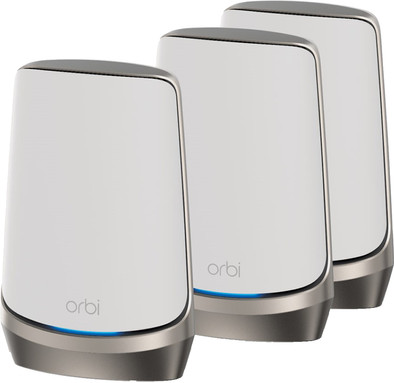
NETGEAR Orbi RBKE963
Never available again
View alternatives in the sidebar
Choose your router:
3
Number of stations
View alternatives in the sidebar
Choose your router:
3
Number of stations
According to our router expert
Fastest WiFi standard | Wireless AXE (WiFi 6E) | |
|---|---|---|
Ethernet speed | 10Gb Ethernet (10,000Mbps) | |
Frequency bands | Quad-band | |
WiFi speed | AX11000 | |
Number of Ethernet ports | 4 | |
Type router | Mesh WiFi system | |
Number of stations | 3 | |
Living situation | Large apartment, Single-family home |
5 stars
4
4 stars
5
3 stars
2
2 stars
0
1 star
0
Range
Installation ease
Stability
Speed
Design
I have already tested a lot of mesh WiFi systems at my home. If I install it completely wireless, that usually means that my speed in the attic is limited. The Netgear Orbi RBKE963 is the fastest and most powerful mesh system available today. In addition, thanks to Wifi 6E, it offers an extra frequency band. It should therefore come as no surprise that I also achieve high speed in the attic with this system. With the Orbi RBKE963 I have full coverage in an average house.
But let's start at the beginning: the installation. It goes smoothly and easily. Once I install the app, installation is a breeze. The app guides me through the process and gives clear directions. This way the installation goes straight away. You do not need any network knowledge to install it.
The Orbi mesh system works within 10 minutes. Time to test the speeds everywhere. I have the fastest internet subscription possible at my address and I actually get the practical maximum speed everywhere. The bottleneck is the equipment of my provider, so that I lose 5 percent speed. The Netgear Orbi RBKE963 has 10 Gbps and 2.5 Gbps network connections. So there is still plenty of opportunity for a higher internet speed.
With Wifi 6E, the Orbi RBKE963 supports an additional frequency band. This frequency band is hardly used, so you are less bothered by the Wi-Fi of the neighbors. A disadvantage is that none of my devices support this by default. But I am prepared for the future with this. In addition, the Orbi satellites do use this frequency to communicate with each other. That's why the speed is so high.
I have quite a few devices with WiFi that are constantly connected to the internet. Not only my smart TV, phone, tablet, laptop, but also all kinds of smart devices. Thanks to Wifi 6E, this is no problem at all. I connect dozens of devices at the same time, without my WiFi hiccups.
The range is also fine. Not only do I have WiFi coverage on all floors of my house, but I also still have good WiFi in the back of the garden. The speed is not maximum there, but sufficient for background music while gardening. My IP cameras and smart doorbell outside also have sufficient reception for a high-quality stream.
The Netgear Orbi RBKE963 is the most powerful mesh WiFi system at the time of writing. That is not only the case in theory, in practice this mesh system also makes it true. If you want the best WiFi right now and want to be prepared for even faster internet connections, this is a good choice.
Uhro van der Pluijm
10 June 2022
Automatically translated from Dutch
After a lot of Googling and two attempts I had the orbi netgear working over 1 router and 5 satellites . It's a pity that setting in the AP (access point) mode is not in the abbreviated manual, while this is usually the only option behind your router modem from your provider. You want the modem of your provider to distribute the IP addresses . In a stable network it is desirable that 1 device or server does this. I think that the AP mode is the most used mode. How to put the orbi router in AP mode 1 . Connect a computer to the orbi router and launch a web browser. 2. Go to the following configuration page : http:// orbilogin.com 3. You will be prompted to enter a username and password. Username : admin Password: password
If the default credentials don't work, you probably changed the administrator password yourself. 4. Select Advanced > Advanced Setup > Router/AP Mode. 5. Select AP mode 6. Click Apply.
Hope this review helps someone.
Matthijs
6 June 2022
Automatically translated from Dutch
What a relief this NETGEAR Orbi Quad-band WiFi 6E mesh system. Super stable and fast WiFi in and around the house, even with WiFi 5 and 6. Logically you also need a fast internet connection.
Lars Bongers
8 May 2022
Automatically translated from Dutch
Product number | 903359 | |
|---|---|---|
Manufacturer code | RBKE963-100EUS | |
Brand | Netgear | |
Warranty | 2 years | |
Processing of your defect | At your home | |
Old product returned for free |
Type router | Mesh WiFi system | |
|---|---|---|
WiFi speed class | High-end | |
Usage situation | Work from home | |
Living situation | Large apartment, Single-family home | |
Number of stations | 3 | |
Can be expanded with extra stations | ||
Built-in modem |
Fastest WiFi standard | Wireless AXE (WiFi 6E) | |
|---|---|---|
Frequency bands | Quad-band | |
WiFi speed | AX11000 | |
2.4GHz band speed | 1200 Mbit/s | |
5GHz band speed | 4800 Mbit/s | |
Speed of 6Ghz band | 4800 Mbit/s | |
Number of WiFi antennas | 12 | |
Jumbo frame support |
Ethernet speed | 10Gb Ethernet (10,000Mbps) | |
|---|---|---|
Network connector | ||
Number of Ethernet ports | 4 | |
PoE support | ||
USB port |
SIM card slot |
|---|
Quality of Service (QoS) | ||
|---|---|---|
MU-MIMMO | ||
Seamless roaming | ||
Beamforming | ||
Port forwarding | ||
LACP Link aggregation |
Parental controls | ||
|---|---|---|
WLAN security | WEP, WPA, WPA-PSK, WPA2, WPA2-PSK | |
Firewall | ||
Firewall type | DoS, NAT Firewall, SPI Firewall | |
Guest network | ||
VPN support | ||
VPN server | ||
VPN client | ||
VPN passthrough |
Mounting possible | ||
|---|---|---|
Width | 19,05 cm | |
Height | 27,94 cm | |
Depth | 8,38 cm | |
Weight | 1363 g | |
Color | White | |
Material | Plastic |
Power supply type | Power grid |
|---|