MSI Raider GE78 HX 14VHG-641NL
Never available again
View alternatives in the sidebar
Choose your MSI Raider:
RTX 4080 - Intel Core i9 - 32GB - 2TB SSD
Choose your MSI Raider
View alternatives in the sidebar
Choose your MSI Raider:
RTX 4080 - Intel Core i9 - 32GB - 2TB SSD
Choose your MSI Raider
According to our laptop expert
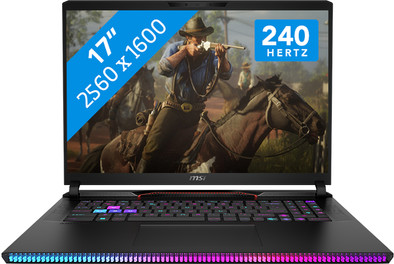
Step into a new gaming dimension with the 17-inch MSI Raider GE78 HX 14VHG-641NL gaming laptop. Thanks to the 14th generation Intel Core i9 processor and 32GB DDR5 RAM, you can run the most demanding games and programs without slowing down or stuttering. You can also stream in 4K without any problems, which allows your viewers to enjoy sharp images. With the NVIDIA GeForce RTX 4080 video card, your demanding games like Elden Ring and Starfield run smoothly at 60 fps in QHD. Play Shooters extra smoothly due to the 240Hz screen. On top of that, you can store games, expansion packs, and other media on the 2TB SSD. This way, you combine fast loading games with simple storage. Like to game in the evening? Turn on your keyboard backlight so you can see all your moves even in the dark. it's also possible to easily expand the RAM and storage capacity if you want to take your laptop to the next level.
Note
: always connect the charger while gaming, or the performance won't be as good and the battery will run out within a couple of hours.Receive an email with a personal voucher code for 1 free year of Norton 360 Deluxe antivirus 1 day after purchase.
Screen size | 17 inches | |
|---|---|---|
Processor | Intel Core i9 | |
Internal RAM | 32 GB | |
Total storage capacity | 2 TB | |
Video card | NVIDIA GeForce RTX 4080 | |
Recommended for use | Gaming, Music production and DJing, Software development, Video editing | |
Panel type | IPS panel | |
Build quality laptops | High-end |
5 stars
1
4 stars
0
3 stars
0
2 stars
0
1 star
0
The MSI Raider GE78 HX 14VIG-639NL is a powerful laptop aimed at gamers and content creators who need top performance. With its impressive specifications and innovative design, this laptop is an excellent choice for anyone considering serious gaming or heavy applications. Below I will discuss the most important features, pros and cons of this laptop.
Key specifications: Processor: The Intel Core i9-14900HX with 24 cores provides unparalleled multitasking capabilities and makes heavy applications run smoothly. It is currently one of the most powerful processors for laptops, especially aimed at gamers and professionals who perform heavy tasks. This processor has 24 cores and supports hyperthreading, which means it can process up to 32 threads. This makes it particularly suitable for multitasking, gaming, and demanding applications such as video editing and 3D rendering.
Graphics card: The NVIDIA RTX 4090 is currently the latest graphics card and delivers exceptional gaming performance with advanced ray tracing and AI features. This graphics card is a real winner and guarantees an immersive gaming experience.
Display: The 17.3-inch QHD 240Hz display offers sharp images and smooth gameplay, which is ideal for fast-paced games. The screen size is perfect for a gaming laptop; it is not too big and not too small.
RAM: The laptop is expandable to 96GB DDR5 RAM, with speeds of up to 5600MHz, which ensures smooth multitasking and gaming. (Be careful with this if you do not want your laptop to demand a lot of your battery, because it can do that as soon as you expand the RAM memory to the maximum. This is what I experienced myself.)
Storage: With a 1TB NVMe SSD, boot times and loading times of games and applications are lightning fast. This is crucial for gamers who want to work efficiently.
Cooling: MSI's Cooler Boost 5 technology with dedicated fans for the CPU and GPU keeps the system cool, but during intense gaming sessions the laptop may feel a bit warmer at the bottom. It is therefore useful to use a laptop stand with a cooler for heavy tasks. (I also bought this via Coolblue. The fans can be loud on the highest performance settings, but fortunately the laptop also offers a 'silent mode' via the MSI Center application.
Keyboard and trackpad: The plastic keyboard has an excellent typing experience with good feedback and fully customizable RGB lighting in the Steelseries application, ideal for long-term use. The precision trackpad is responsive and easy to use.
Connectivity: The laptop has various ports, including Thunderbolt 4, USB-C, USB-A and HDMI, which ensures versatile connectivity with various devices and accessories.
Audio experience: One of the few drawbacks of the laptop is the sound quality of the speakers. Although they are not great, users can enjoy a better audio experience by connecting a good pair of headphones or good external speakers. With the Nahimic application you can fully customize the audio settings, for example how you want the surround system and all kinds of audio effects.
Battery life and energy consumption: A major point of attention is the battery life. Despite the powerful hardware, the laptop has a limited battery life with intensive use. The battery also charges relatively slowly and drains quite quickly when the charger is not connected. The battery life has become even shorter and the charging time even longer, after a maximum upgrade of the RAM memory. (This does not necessarily happen to everyone.) But this was also the case a bit before the upgrade. I myself have done a correctly executed maximum RAM expansion to 96GB. (This may be a concern for some users, especially if they are often on the go, then I would recommend leaving the laptop as is, and not upgrading the RAM. I found that if I set the GPU switch to integrated graphics mode, in the MSI center application, (this uses the second video card which is a lot less powerful, but is also just fine when you are not gaming etc.) the battery drains less quickly. But this is not a real solution, because of course you almost always want to enjoy that great RTX 4090 video card to the max, unless of course you do not have to perform heavy tasks. The (small) problem also remains when you want to put it in MShybrid mode, so that the laptop makes balanced use of the video card and uses it when it needs it, and then automatically uses it a bit less again; for example when you are surfing online and not gaming, or playing a lighter game. or performing another light task. Charging the battery is still a point of concern.) Ultimately, I’m willing to pay for it, because I get such a beast of a laptop in return, and because you have to leave your laptop adapter plugged in during heavy tasks anyway.
Software options: The MSI Center software offers a variety of options for system monitoring, performance management, and customization of settings. This helps users tune their laptop to their specific needs and desires. And there are also a few other applications that you can install for a better user experience.
Conclusion: The laptop is an excellent choice for gamers and content creators who need high performance and are willing to give up some portability for power. With its state-of-the-art specs, and beautiful display, it is a top contender in the premium gaming laptop market. The powerful Intel Core i9-14900HX, the NVIDIA RTX 4090, and the 32GB of RAM ensure an exceptional gaming experience and multitasking capabilities. Despite some shortcomings, such as the sound quality of the speakers and the limited battery life, this laptop remains an impressive choice for those looking for a powerful and reliable gaming experience.
Overall, the MSI Raider GE78 HX 14VIG-639NL offers strong value for money and is an ideal laptop for those who demand serious performance.
Ferdi
13 October 2024
Automatically translated from Dutch
If you purchase of a laptop or desktop, you receive 1 year of Norton 360 Deluxe for free. One day after purchase, you'll receive an email with a personal voucher code. Go to the promotional Terms and Conditions for more information.

Product number | 944585 | |
|---|---|---|
Manufacturer code | 9S7-17S151-641 | |
Brand | MSI | |
Warranty | 2 years | |
Processing of your defect | Via Coolblue | |
Old product returned for free |
Operating system | Windows | |
|---|---|---|
Screen size | 17 inches | |
Processor | Intel Core i9 | |
Internal RAM | 32 GB | |
Total storage capacity | 2 TB | |
Video card | NVIDIA GeForce RTX 4080 | |
Touchscreen | ||
Recommended for use | Gaming, Music production and DJing, Software development, Video editing | |
Speed class laptops | High-end | |
Build quality laptops | High-end | |
Screen quality: laptops | High-end |
Panel type | IPS panel | |
|---|---|---|
Resolution width | 2560 pixels | |
Resolution height | 1600 pixels | |
Refresh rate | 240 Hz | |
Screen reflection | Anti-glare | |
Adaptive Sync | ||
Type of adaptive sync | G-Sync | |
Brightness | 400 cd/m2 |
Processor number | 14900HX | |
|---|---|---|
Processor generation | 14th gen | |
Processor cores | Tetracosa-Core (24) | |
Processor code name | Raptor Lake | |
Clock speed | 1,6 GHz | |
Turbo speed | 5,7 GHz | |
Cache memory | 36 MB | |
Intel Evo laptop |
Maximum internal memory | 64 GB | |
|---|---|---|
Memory composition | 2x 16GB | |
Memory slot 1 | 16 GB | |
Memory slot 2 | 16 GB | |
Total number of RAM slots | 2 | |
RAM type (DDR type) | DDR5 |
Storage type | SSD | |
|---|---|---|
SSD storage capacity | 2000 GB | |
Hard drive type | NVMe |
Video card brand | NVIDIA | |
|---|---|---|
Type of video card | Dedicated | |
Video card RAM | 12 GB |
Windows OS version | Windows 11 Home | |
|---|---|---|
Operating system language | Multiple languages can be configured |
Laptop model | Laptop | |
|---|---|---|
Color | Gray | |
Material | Metal, Plastic | |
Metal type | Aluminum | |
Material top of laptop | Metal | |
Material keyboard casing laptop | Plastic | |
Material bottom of laptop | Metal | |
Height | 2,3 cm | |
Width | 38 cm | |
Depth | 29,8 cm | |
Weight | 3 kg | |
Type of military test | MIL-STD-810H | |
Passed military test |
Mobile data connection | No | |
|---|---|---|
WiFi standards | Wireless A (WiFi 2), Wireless AC (WiFi 5), Wireless AX (WiFi 6), Wireless AXE (WiFi 6E), Wireless B (WiFi 1), Wireless BE (WiFi 7), Wireless G (WiFi 3), Wireless N (WiFi 4) | |
Bluetooth | ||
Bluetooth version | 5.3 |
USB port | ||
|---|---|---|
Number of USB ports | 4 | |
Type of USB port | Standard USB-A, USB-C | |
Protocol Female USB-C port | DisplayPort Alternative Mode, Thunderbolt Alternative Mode, USB, USB electricity | |
USB version Female USB-C port | 4.0 | |
Video output via USB-C possible | Yes | |
Number of female standard USB-A ports | 2 | |
Female standard USB-A port version | 3.0, 3.1 | |
Number of USB 3.1 Female USB-C port | 2 | |
HDMI connector | ||
Number of HDMI connectors | 1 | |
Female HDMI Type A port version | 2.1 | |
DisplayPort connector | ||
VGA connector | ||
Number of Ethernet ports | 1 | |
Thunderbolt connector | ||
Headphone jack | ||
Memory card reader |
Keyboard layout | QWERTY | |
|---|---|---|
Physical keyboard layout | ANSI | |
Numeric keypad | ||
Spill-resistant | ||
Backlit keyboard | ||
Color keyboard lighting | Multicolor | |
Mechanical keyboard | ||
Programmable keys |
Built-in microphone | ||
|---|---|---|
Number of speakers | 2 | |
Sound reproduction | Stereo | |
Integrated computer speakers brand | Standard speakers |
Built-in camera | ||
|---|---|---|
Image definition webcams | Full HD (1080p) |
Battery capacity laptop | 90 Wh | |
|---|---|---|
Battery technology | Lithium polymer | |
Maximum battery life | 4 hours | |
Power charger | 330 W |
Manufacturer's warranty |
|---|
TPM (Trusted platform module) | ||
|---|---|---|
TPM type | Discrete TPM chip | |
Kensington lock | ||
Windows Hello | ||
Fingerprint identity sensor | ||
Infrared camera | ||
Security class laptops | Basic |
Number of replaceable RAM slots | 2 |
|---|---|
Number of free RAM slots | 0 |
RAM expandable up to | 64 GB |
Extra installed software |
|---|