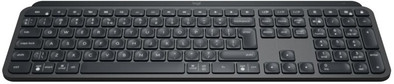
Logitech MX Keys Toetsenbord Qwerty
Never available again
View alternatives in the sidebar
View alternatives in the sidebar
According to our keyboard expert
Type more comfortably than ever before with the Logitech MX Keys Keyboard. The keys of the MX Keys are specially designed with the shape of your fingertips in mind, so every touch feels smooth and the keyboard remains stable. It also ensures that your keystrokes make less noise. You can connect the MX Keys to multiple devices at the same time and switch devices with the push of a button. That's useful if you have both a PC and a laptop, for example. The adjustable lighting, which only turns on when your hands are close to the keyboard and adjusts to the lighting of the environment is another new feature.
Connection type | Wireless | |
|---|---|---|
Backlit keyboard | ||
Keyboard composition | Keyboard, Numpad | |
Bluetooth | ||
Geographic keyboard layout | US international layout | |
Ergonomic design | ||
Suitable for gaming | ||
Mechanical keyboard |
5 stars
244
4 stars
78
3 stars
3
2 stars
1
1 star
0
Installation ease
Ergonomics
This keyboard is a bit of an investment, but then you have something! The texts typed correctly the first time fly out... I think this makes me a lot more productive, and that for that reason alone I can ask for a salary increase, with which I could get the investment back ;-)
Actually, I prefer to use a mechanical keyboard, but they are also very expensive, and because of the sound that is not an option for both home and office (I don't have the space to myself at home and at the office ;-) Despite this keyboard has 'flat keys' (scissor switches I believe) it allows me to type quickly yet error-free. This is not only due to a well-set action (i.e. from what pressure the key actually presses), the travel (i.e. by what distance the key is depressed) but also due to the concave notches in the center of each key. The keystroke is also a lot quieter than most other keyboards, which makes it very suitable for working from home (eg for typing during a Teams or Zoom meeting) or in an office with colleagues sitting next to you.
The 'unique selling point' of this keyboard is the combined MacOS and Windows layout. Namely, from work I got a Windows laptop, and privately I use MacOS. With a keyboard for one thing or another you can also control both (for years with a Windows keyboard I have operated MacOS, and vice versa, and that always worked fine because of 'muscle memory' for the shortcuts in both environments). But now, with the combined layout of this keyboard, the layout is just right in any environment and I honestly like that very much.
Another good feature of this keyboard is that you can easily save three different Bluetooth connections, and that switching between the three devices is quite smooth. Sometimes the connection to MacOS won't go as smoothly, but I think that's a problem with older versions of MacOS (Mojave in my case), and I don't think it's because of the keyboard.
The included Logitech software, Logi Options, allows you to change the function of most function keys. I don't use this, but it can be very useful for certain users. It also seems that with Logi Options you can set a kind of 'flow' function, so that in combination with an MX mouse you can easily switch between different devices by moving the MX mouse to the edge of the screen. I haven't been able to try this out, firstly because I don't have an MX mouse and secondly because I can't get Logi Options installed on my work laptop. Despite that, the bluetooth connection with my work laptop works correctly, and I can simply switch by pressing the button on the keyboard.
Despite the hefty price, I am very happy with the keyboard. I am allowed to come to the office once a week (I make medicine, which is a crucial profession) and because this keyboard is so nice to type, I now even take it with me to the office. I just can't type on those "soggy" standard office keyboards anymore. So I also bought a special soft case for these MX Keys to get the MX Keys neat and undamaged from home to the office and back ;-)
I don't think this is a suitable keyboard for gamers who actually prefer a mechanical and wired keyboard with ultra-low latency, high action and long travel etc. But for people who type a lot of texts, and switch between MacOS and Windows every now and then , this is an ideal keyboard.
Rogier van Oostrom
14 April 2021
Automatically translated from Dutch
The MX Keys keyboard is a perfect choice for those who often process texts, but especially for Excel users. Silently illuminated keystrokes, ergonomic keyboard layout and extremely attractive design are the main features of the MX Keys. The lighting of the keys can be adjusted in various positions and is automatically set to the amount of lumen at your workplace. It's a shame that the lighting goes out quickly after a few seconds of inactivity, but I think the product developers chose this to save battery. A battery that guarantees an extremely long working time and can also be charged quickly via USB-c cable. The steel scroll wheels work perfectly and in particular the scroll wheel placed at the top left for horizontal scrolling is an extremely pleasant added value, especially for scrolling in Excel documents. And last but not least, scrolling is virtually silent. There are many personal setting options for each application. The ergonomic layout of the keys has been well thought out and I think the result is a success. In the beginning I had to get used to the slightly different position of the Alt key (a little more to the right) and the relatively small size of the space bar. The keys (except the top row of function keys) have a slight notch. The noiseless touch also feels extremely pleasant. I linked the keyboard to two networked desktops and the link went fine via the software, which you actually have to download to make the most of the MS Keys. The downside is that you are required by Logitech to register as a user. To my surprise, Logitech has not opted for legs on the bottom for this keyboard, but I must confess that the keyboard is rock solid on my desktop (on a mat). Switching between the two desktops is quick and hassle-free. I have not been able to test the flow technique so far, because I work with 2 desktops via 1 screen. But the reports about this are promising, you can connect up to 3 devices. In conclusion: The MX Keys keyboard is a top product, not cheap but well worth the price tag.
Fred
1 July 2020
Automatically translated from Dutch
In use for a while now for business purposes (no games) and keyboard is very good. The travel is fine, making it comfortable to type even during prolonged use. The layout took some getting used to. For example, due to the ISO standard that Logitech uses, the left Shift key is small and not elongated. And so there are a few keys different compared to the ANSI format that almost all other manufacturers use. So I mistyped in the beginning because of that. Well, that came naturally.
The fact that you can switch between 3 laptops / PCs with 3 separate keys is really a godsend. You can connect the keyboard to different unify receivers or via Bluetooth. For the first you need the Logitech software. If you have a Logitech mouse (MX 3 for example), you can connect it to the same receiver. The reason I chose Logitech is because I already had the MX mouse.
Nothing can be said about the lifespan after a few weeks. The battery is now working fine. But I wonder how long that will last. Replacement seems difficult to me - if at all possible.
It's a solid price, but I recommend the keyboard. Especially in combination with an MC mouse.
M@rtin
11 March 2021
Automatically translated from Dutch
Product number | 838634 | |
|---|---|---|
Manufacturer code | 920-009415 | |
Brand | Logitech | |
Processing of your defect | Via Coolblue | |
Old product returned for free |
Keyboard layout | QWERTY | |
|---|---|---|
Geographic keyboard layout | US international layout | |
Physical keyboard layout | ISO | |
Typing comfort | Basic | |
Backlit keyboard | ||
Spill-resistant | ||
Color lighting | White | |
Number of colors lighting | 1 | |
Brightness of backlight adjustable | ||
Programmable keys | ||
Multimedia shortcuts | ||
Flat keys | ||
Suitable for gaming | ||
Mechanical keyboard |
Connection type | Wireless | |
|---|---|---|
Bluetooth | ||
Bluetooth version | 4.0 |
Power supply type | Rechargeable battery |
|---|
Keyboard composition | Keyboard, Numpad | |
|---|---|---|
Ergonomic design | ||
Height | 2 cm | |
Width | 43,02 cm | |
Depth | 13,16 cm | |
Wrist rest | ||
Color | Black | |
Weight | 0,81 kg |