ASUS ProArt P16 OLED H7606WI-ME006X
Never available again
View alternatives in the sidebar
View alternatives in the sidebar
According to our laptop expert
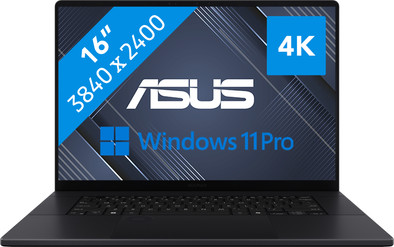
Edit your demanding marketing materials and company videos in 4K with the ASUS ProArt P16 OLED H7606WI-ME006X. On the 16-inch 4K OLED display with 100% DCI-P3 color coverage, all details look sharp and you can enjoy a high color contrast. That way, you can easily make the most detailed edits. Thanks to the AMD Ryzen AI 9 processor, the 32GB DDR5 RAM, and the NVIDIA GeForce RTX 4070 video card, you can make the most demanding graphic edits without problems. Edit a 2-hour company video in Adobe Premiere Pro or create 3D blueprints in Blender, for example. The AI NPU of the AMD processor learns your frequently used settings and optimizes these with a speed of up to 81 TOPS. The processor also works together well with Copilot, so your daily work goes a lot faster. You can store your files and media on the 1TB SSD. This allows you to store large media files and open them fast.
Note: some Copilot+ PC functions require a free update. This update will be available early 2025.
Receive an email with a personal voucher code for 1 free year of Norton 360 Deluxe antivirus 24 hours after purchase, worth € 94.99.
Screen size | 16 inches | |
|---|---|---|
Processor | AMD Ryzen AI 9 | |
Internal RAM | 32 GB | |
Total storage capacity | 1 TB | |
Video card | NVIDIA GeForce RTX 4070 | |
Recommended for use | Business use, Data science, Music production and DJing, Photo editing, Software development, Video editing | |
Panel type | OLED | |
Build quality laptops | High-end |
5 stars
3
4 stars
1
3 stars
0
2 stars
0
1 star
0
First impression For this review I was allowed to test the ASUS ProArt P16 OLED for a few weeks.
The laptop comes with the pressure-sensitive ASUS Pen 2.0, the laptop cannot be laid flat, so in fact you only make some adjustments and not complete drawings on your screen, and that is a shame.
A separate drawing tablet is therefore a must, the touchscreen on the other hand makes working without an external mouse more convenient, although you do have to clean your screen afterwards.
The DialPad did not work immediately but still needed some updates. This can be adjusted by holding the touch button in the middle. That works well at first, but during use your finger touches the touch button and if you hold it down for too long, the settings screen opens, which causes a lot of annoyance and makes the DialPad unworkable.
A central keyboard looks nice and works well for a lot of typing, but many design programs require a numeric keypad, so you will have to use an external keyboard. This does provide space for very good speakers with Dolby Atmos, which makes it limp back to a media laptop, and we already have enough of those.
OLED 4K If you are used to an HD screen where you always have to enlarge your menus, 4K is a revelation, even small letters are exceptionally sharp without adjustments in Windows, a solution for programs where the font cannot be set, read enlarged.
The box also contains a warning about the possible burn-in of OLED screens, which is contradictory given that ASUS has stated on various media that this does not happen with their screens. With computer programs, menu texts are constantly in the same location, so I don't know what to think of such a warning.
Whisper and performance mode As long as you are working on battery power, the laptop is in whisper mode by default, the fans are always off. To enable the graphics card, you will have to set it to performance mode and that is only possible when the laptop is connected to the charger. You can set the battery to not be charged more than 80%.
Some software, including ASUS MuseTree, does not even work without the graphics card, so note that it does not work without a power supply either. The program checks this in advance when it is started. When using the GPU, the 3 fans will start running in performance mode.
What is confusing is that you can not only set the laptop in the ProArt Creator Hub, but that the AMD processor and Nvidia GPU also have their own settings menu. I think it is wise not to change these settings but to let ASUS do this.
Artificial intelligence The Copilot key could have been omitted because the AI that you open with it can also be reached via a browser, you are now missing the right control key, I would have preferred a Play button rather than a smiley key, it is a creator laptop and not a toy, right? There is enough AI available that simply works via the GPU, then a separate NPU seems unnecessary
Conclusion If you work a lot on the go, this is a very nice laptop, I just wonder how often this happens to buy this laptop for this, because of the high price there is normally no budget left for peripherals and if you really want to create then you need it, then I prefer to pay less for a laptop without a 4K screen that I then spend on an external monitor, a good mouse and keyboard and a separate drawing tablet. A healthy body is also worth something to me.
Vincila699
19 September 2024
Automatically translated from Dutch
I tested this laptop for only a couple weeks and I am really thinking of keeping it. As a traveling photographer and programmer, I spend most hours in front of screens. This laptop gets rid of the need for many external tools I usually carry: speaker, drawing tablet and pen, calibrated external screen, webcam. And it does it well. I played games and appreciated the beautiful landscapes in them as if it was the first time. I used it in the dark and in full sunlight, and I had almost no problems. Perhaps the exception is the implementation of Windows Hello, which did disappoint me, but I can live without it. The sound coming from this laptop did not sound like the sound coming from a laptop. Deep base and full sound. Full stop. I played games, listened to music and watched movies. I preferred it to my medium-range external Bluetooth speaker. I also had fun using the touchscreen for editing, together with the included pen, and also for playing puzzle games. However, I do not like the idea of fingerprints on this beautiful screen, so I do not think I would do that regularly. Power-wise, I have zero complaints. Quick and quiet, which is a rare combination, but of course you can see the sacrifice made in the temperatures that the bottom can reach. I did not see any performance issues even when hot.
MultipassionateTechie
10 November 2024
Automatically translated from Dutch
The past few weeks I was able to test this laptop. With 16 inches it is a somewhat larger laptop. This is why I find it especially nice for home use. I have used the laptop for administration, watching series, digital design, but also games. The laptop can handle this well. The screen is large, bright and the colors are vivid. Watching series is as good as on my OLED TV (TV wins mainly in terms of screen size). Furthermore, the battery lasts all day, depending on how intensively you use it. The keyboard includes a shortcut to the ProArt Creator Hub. Here you can see a lot about the performance of the laptop and you can also manage ASUS Dial. At first it takes some getting used to, but then I really like it. It is easy to turn on and off via the touchpad. Furthermore, both the light of the keyboard and the screen can be dimmed. I like a dark setting, so I also think this is a plus for the laptop.
Fre123
17 November 2024
Automatically translated from Dutch
If you purchase of a laptop or desktop, you receive 1 year of Norton 360 Deluxe for free. One day after purchase, you'll receive an email with a personal voucher code. Go to the promotional Terms and Conditions for more information.

Product number | 952010 | |
|---|---|---|
Manufacturer code | 90NB1421-M00760 | |
Brand | ASUS | |
Warranty | 2 years | |
Processing of your defect | Via Coolblue | |
Old product returned for free |
Operating system | Windows | |
|---|---|---|
Screen size | 16 inches | |
Processor | AMD Ryzen AI 9 | |
Internal RAM | 32 GB | |
Total storage capacity | 1 TB | |
Video card | NVIDIA GeForce RTX 4070 | |
Touchscreen | ||
Recommended for use | Business use, Data science, Music production and DJing, Photo editing, Software development, Video editing | |
Speed class laptops | High-end | |
Build quality laptops | High-end | |
Screen quality: laptops | High-end |
Panel type | OLED | |
|---|---|---|
Sharpness | WQUXGA | |
Resolution width | 3840 pixels | |
Resolution height | 2400 pixels | |
Refresh rate | 60 Hz | |
Screen reflection | Glossy | |
Color space | DCI-P3 | |
Adaptive Sync | ||
Brightness | 500 cd/m2 | |
HDR support | ||
Type of HDR | DisplayHDR 500 True Black | |
Blue light filter |
Processor number | 370 | |
|---|---|---|
Processor generation | AI 300 Series | |
Processor cores | Dodeca-Core (12) | |
Processor code name | Strix Point | |
Clock speed | 2 GHz | |
Turbo speed | 5,1 GHz | |
Cache memory | 36 MB |
Neural Processing Unit (NPU) | AMD Ryzen AI |
|---|---|
TOPs | 50 |
Microsoft Copilot+ PC | Yes |
Memory composition | 1x 32GB | |
|---|---|---|
Memory slot 1 | 32 GB | |
Total number of RAM slots | 1 | |
RAM type (DDR type) | DDR5 |
Storage type | SSD | |
|---|---|---|
SSD storage capacity | 1 TB | |
Hard drive type | NVMe |
Video card brand | NVIDIA | |
|---|---|---|
Type of video card | Dedicated | |
Video card RAM | 8 GB |
Windows OS version | Windows 11 Pro | |
|---|---|---|
Operating system language | Multiple languages can be configured |
Laptop model | Laptop | |
|---|---|---|
Color | Black | |
Material | Metal | |
Metal type | Aluminum | |
Material top of laptop | Metal | |
Material bottom of laptop | Metal | |
Height | 1,7 cm | |
Width | 35,4 cm | |
Depth | 24,6 cm | |
Weight | 1,85 kg | |
Type of military test | MIL-STD-810H | |
Passed military test |
Mobile data connection | No | |
|---|---|---|
WiFi standards | Wireless A (WiFi 2), Wireless AC (WiFi 5), Wireless AX (WiFi 6), Wireless AXE (WiFi 6E), Wireless B (WiFi 1), Wireless BE (WiFi 7), Wireless G (WiFi 3), Wireless N (WiFi 4) | |
Bluetooth | ||
Bluetooth version | 5.4 |
USB port | ||
|---|---|---|
Number of USB ports | 4 | |
Type of USB port | Standard USB-A, USB-C | |
Protocol Female USB-C port | DisplayPort Alternative Mode, USB, USB electricity | |
USB version Female USB-C port | 3.1, 4.0 | |
Video output via USB-C possible | Yes | |
Number of female standard USB-A ports | 2 | |
Female standard USB-A port version | 3.1 | |
Number of USB 3.1 Female USB-C port | 1 | |
HDMI connector | ||
Number of HDMI connectors | 1 | |
Female HDMI Type A port version | 2.1 | |
DisplayPort connector | ||
VGA connector | ||
Thunderbolt connector | ||
Headphone jack | ||
Memory card reader |
Keyboard layout | QWERTY | |
|---|---|---|
Physical keyboard layout | ANSI | |
Numeric keypad | ||
Spill-resistant | ||
Backlit keyboard | ||
Mechanical keyboard | ||
Programmable keys | ||
Copilot test |
Built-in microphone | ||
|---|---|---|
Number of speakers | 2 | |
Sound reproduction | Stereo | |
Integrated computer speakers brand | Harman Kardon |
Built-in camera | ||
|---|---|---|
Image definition webcams | Full HD (1080p) | |
Camera slider |
Battery capacity laptop | 90 Wh | |
|---|---|---|
Battery technology | Lithium-ion | |
Maximum battery life | 7 hours | |
Power connector input type (female) | Other brand/product specific | |
Power charger | 200 W | |
Laptop wattage | 200 W |
Manufacturer's warranty |
|---|
TPM (Trusted platform module) | ||
|---|---|---|
TPM type | Firmware TPM | |
Kensington lock | ||
Windows Hello | ||
Infrared camera | ||
Security class laptops | High-end | |
Built-in privacy screen |
Number of replaceable RAM slots | 0 |
|---|---|
Number of free RAM slots | 0 |
Number of replaceable storage slots | 2 |
Number of free storage slots | 1 |
Extra installed software |
|---|